Best Webflow Templates for Construction Companies in 2026

A potential client shortlists three contractors. They visit all three websites. Two look like real businesses. One looks like it hasn't been touched since 2016. The contract goes to one of the first two - and the third firm never finds out why the phone stopped ringing. This is how construction companies lose work: not on price, not on capability, but because the website made someone quietly choose the competition instead.
According to a 2026 construction website study by Pravah Consulting, 87% of potential clients start their contractor search online — and 92% of that research happens on mobile devices. Industry benchmarks now expect construction websites to convert visitors at 2.8% on average (CuFinder, 2026 Construction Industry Marketing Benchmarks), with mobile-friendly sites seeing 67% higher conversion rates than non-optimised equivalents (Pravah Consulting, 2026). A bigger shift in the same period: Google's local "map pack" now drives 60% to 70% of contractor leads, up from 40% to 45% two years ago (CuFinder, 2026). The contractor whose Google Business Profile and website are both polished wins the shortlist before any prospect picks up the phone — the contractor whose web presence looks dated rarely makes the shortlist at all.
This guide covers the best Webflow templates for construction companies, contractors, and architecture firms in 2026 - reviewed for what actually matters: how well they showcase project work, whether a potential client can request a quote without friction, and whether the owner can update it themselves when a new project is completed.
What does a construction company website actually need to win contracts?
The best construction company websites share four non-negotiable elements: a CMS-powered project portfolio with real photography, individual service pages per trade, a structured quote request form, and testimonials placed on the homepage and service pages - not on a separate page nobody visits. Firms that implement all four consistently outperform competitors relying on phone-number-only footers or generic "contact us" pages.
Most construction websites fall into one of two traps. The first is relying on word of mouth with no web presence - which works until it doesn't, and caps growth to whatever radius existing clients can refer. The second is having a template that looks like every other trade business on the internet: stock photography, generic services text, and a phone number buried in the footer. According to WebFX's 2026 construction marketing data, 62% of customers will ignore a business without a credible web presence - a figure that has risen consistently for five consecutive years.
The job of a construction website is to show your work, explain your services, and make it easy for the right client to reach you. Here is what that requires in practice:
- A project portfolio with real photos. Have at least five completed projects with professional-quality photos ready before launch. A CMS-powered gallery means you can add new completed work yourself without touching code.
- Clear service pages per service type. Residential builds, commercial fit-outs, renovations, architectural design - each deserves its own page explaining what you do, who it's for, and what the process looks like.
- A structured, multi-step quote request form. A form that captures project type, location, rough scale, and timeline qualifies the lead before you pick up the phone. **Multi-step quote forms (2 to 3 steps) convert at 28% to 35%, compared with around 25% for long single-step forms (Foundry CRO, 2026).** Breaking the same fields across multiple steps reduces the perceived effort at each stage.
- Testimonials placed where decisions are made. On the homepage and service pages, next to the point where a visitor is deciding whether to get in touch - not on a dedicated page nobody navigates to.
- Service area information in the page copy. Local SEO is the primary channel for most construction businesses, and the firms that show up in Google's map pack capture the majority of inbound leads. The areas you work in should appear naturally in your page text — and your Google Business Profile must mirror what the site says.
Which Webflow templates are best for construction companies in 2026?
The five best Webflow templates for construction companies in 2026 are FormWise, Builting, Construct X, Nordic, and the broader Webflow Marketplace category. FormWise (Loonis) leads the list at $169 with 20+ pages and full CMS portfolio architecture. The rest range from free to $99 with smaller scope and thinner project portfolio support.
1. FormWise - Best for architecture studios and construction firms
Price: $169 | Pages: 20+ | Style: Minimal, Modern
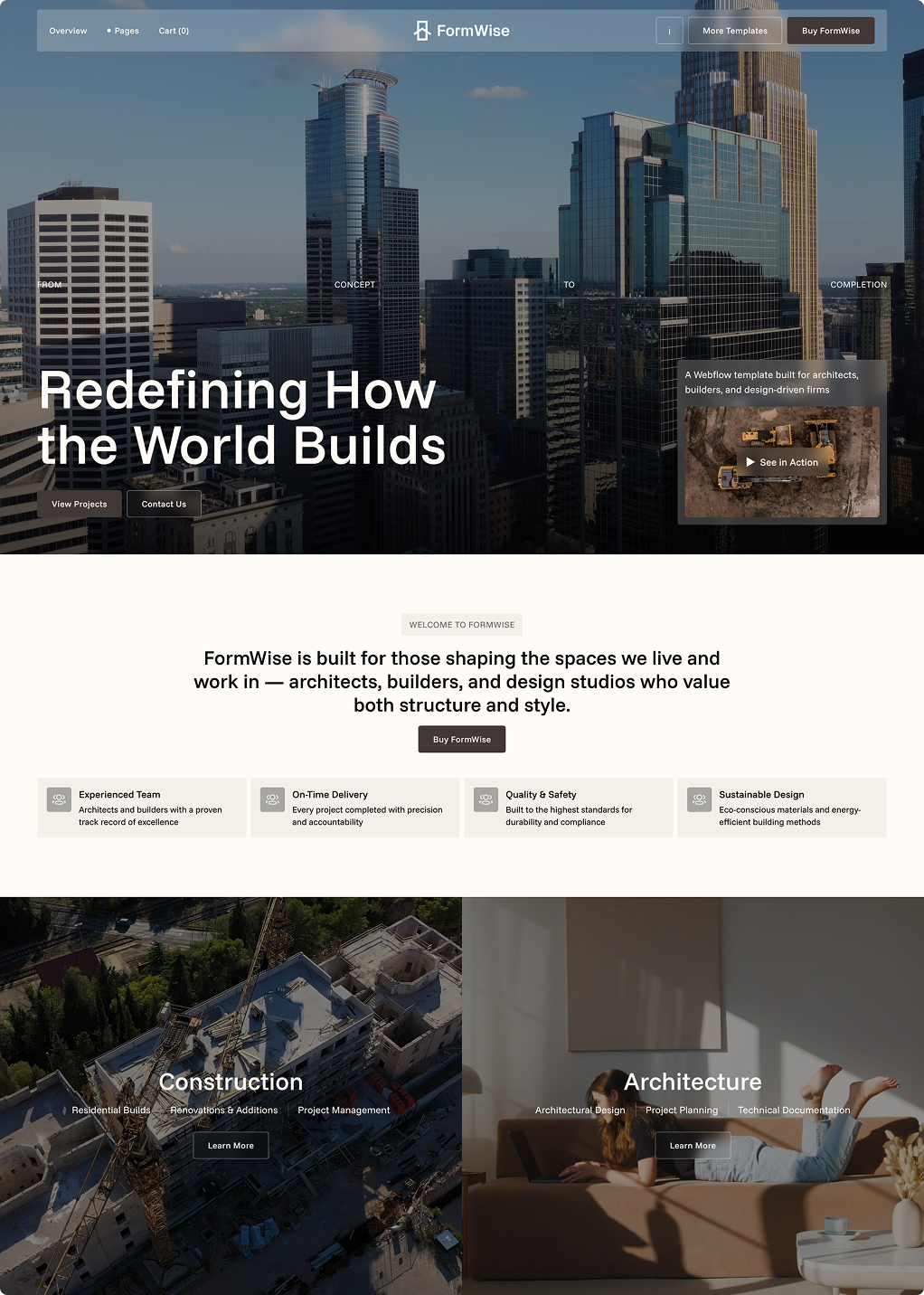
FormWise is a Webflow template designed specifically for construction and architecture firms that lead with their work. Where most templates give you a thumbnail grid and call it a portfolio, FormWise gives you full-width project layouts with space for photography, project scope, materials, and outcome - the kind of presentation that communicates craft rather than just volume. Based on our analysis of the Webflow construction template category, FormWise is the only template at this price point that includes CMS-powered individual project pages out of the box, without requiring custom development.
The minimal aesthetic sits at the intersection of construction's need for solidity and architecture's need for precision. The 20+ page structure covers the full site requirements without padding - CMS-powered project portfolio you update yourself, individual project pages, clearly differentiated service pages, team section, testimonials, and a contact page with proper inquiry flow.
The Figma source file is included with purchase - useful if you or a designer want to review or adapt the layout before going into Webflow.
Best for: Architecture studios, residential and commercial construction firms, interior design practices, building consultants, and design-led contractors whose work quality should be the first thing a visitor sees.
See live preview | Get FormWise - $169
2. Builting by TNCFlow
Price: $79 | Style: Bold, Corporate
A purpose-built construction template with a strong, confident visual identity suited to larger commercial contractors or firms targeting corporate clients. The bold aesthetic works well for heavy industry and commercial builds where the audience expects a serious, structured web presence rather than a design-forward one. The page count is lower than FormWise and the project presentation is less detailed, but the structure covers the core requirements at a lower price point.
Best for: Commercial contractors, civil engineering firms, and construction businesses whose clients respond to a corporate, no-nonsense aesthetic.
3. Construct X by BRIX Templates
Price: $99 | Style: Modern, Clean
A professionally built template with reliable mobile performance and a clean layout. The services section handles multiple service types well, and the team page scales effectively for mid-sized firms. The gap is the project gallery - the CMS implementation is functional but thin for firms whose portfolio is their primary selling tool. Individual project pages are basic compared to what a growing construction company actually needs.
Best for: General contractors or building firms with a modest portfolio who want a clean foundation at a mid-range price.
4. Nordic by FlowRadar
Price: Free | Style: Minimal, Architectural
A well-regarded free template with a strong minimal aesthetic that suits architecture firms. The trade-off for the price is structural depth - lean page count, basic CMS, and more customisation needed for an active firm with a growing project list. Worth considering as a starting point if you have developer time available to extend it.
Best for: Architecture studios or solo practitioners who need a visually strong starting point and have technical help to build it out.
5. Construction templates on the Webflow Marketplace
Price: Free to $79 | Style: Varies
The Webflow Marketplace has a growing selection of construction templates, but quality varies more here than in most categories. The key thing to check before buying any marketplace construction template is whether the project portfolio has real CMS support - meaning each project gets its own page with proper content fields, not just a photo in a grid. Templates where the portfolio is a static image gallery with no CMS will require significant rework as soon as you want to add or update projects.
Best for: Firms with budget constraints who are willing to spend extra time evaluating live previews carefully before committing.
How much does a construction company website cost in 2026?
A construction company website built on a premium Webflow template runs $79 to $169 for the template, plus $23/month for CMS hosting - bringing total first-year cost to approximately $350 to $450 before any setup work. This compares to $2,000 to $8,000 for a freelancer build (4 to 10 weeks delivery) and $10,000+ for a custom agency build. For most construction firms, the template route delivers equivalent results at one-tenth the cost of a freelancer build.
Construction marketing as a category posts strong returns: average ROI runs **280% to 350% across paid and organic channels combined, with SEO posting the strongest long-term return at 681%** (Siana Marketing, 2026 Construction Marketing ROI Report).
Construction business owners understand cost-per-outcome thinking better than most. Here is the honest breakdown:
A Webflow template at $79 to $169 is the raw material - a professionally designed, fully responsive structure on a platform that makes adding new projects and updating service pages straightforward. The investment of time is in setup: populating projects, writing service descriptions, configuring the contact form.
A template plus done-for-you setup at under $2,000 is the option that removes the time cost entirely. Loonis's Pro customisation service takes your purchased template and delivers a fully configured, content-populated, branded site in 5 business days for $1,750. Project portfolio set up in the CMS, service pages written and structured, contact form configured, basic on-page SEO in place. For a firm that bills by the day, the time saved pays for the service.
A freelancer build at $2,000 to $8,000 adds four to ten weeks to the timeline and variable quality. The right choice only when you have specific technical requirements - an online estimating tool, a client portal, complex integrations - that a template cannot accommodate.
Why does mobile performance matter for construction company websites?
Mobile performance is the single most important technical factor for construction company websites in 2026, because 92% of contractor searches now happen on mobile devices and Google's local map pack — which is mobile-first by design — drives 60% to 70% of contractor leads (CuFinder, 2026). Pravah Consulting's 2026 construction website study found that mobile-friendly construction sites see 67% higher conversion rates than non-optimised equivalents. Webflow templates are built mobile-first by default, which means every template in this list — including FormWise — is responsive across devices without additional configuration.
The practical implication is straightforward: a potential client who finds your firm on their phone at a job site, during an evening search, or on their commute should have the same experience as a desktop visitor. Quote request forms must work on mobile. Project photography must load quickly. Phone numbers must be click-to-call. All of these requirements are met by purpose-built templates but often missed by generic business templates adapted for construction.
Frequently asked questions
Can I update a Webflow template myself without a developer?
Yes — updating a Webflow template after initial setup requires no code and no developer. The Webflow CMS works like a simple content editor. Adding a new completed project, updating your services list, or changing your contact details takes minutes. FormWise is built with this in mind — the project portfolio is CMS-powered specifically so you can add new work yourself as jobs complete.
What is the difference between a construction template and a general business template?
A construction-specific template is designed around the content a construction company actually needs: a project portfolio with space for photos, scope, and outcomes; service pages structured for trade services rather than software features; and contact flows designed to capture project inquiries rather than generic queries. Using a general business template for a construction company means spending significant time adapting structures built for a different kind of business — and often the result still does not look like a construction firm.
How do I set up a project portfolio on Webflow?
Webflow's CMS lets you create a collection called "Projects" where each entry is a completed job with its own page. You define the fields — project name, location, service type, description, photos — and the template handles the display. With FormWise, this structure is already built in. You add each project through a simple editor, and the site automatically generates the portfolio grid and individual project pages. No code required after initial setup.
How does Google's map pack affect construction lead generation?
Google's local "map pack" — the three local listings shown at the top of mobile search results with a map — drives 60% to 70% of contractor leads in 2026, up from 40% to 45% two years ago (CuFinder, 2026). Appearing in the map pack requires a complete Google Business Profile with photos of completed projects, consistent name/address/phone information across the web, and a steady stream of positive reviews. Your website then converts the map-pack click into an inquiry, which is why the website and the Google Business Profile must work together.
What conversion rate should a construction website hit?
The 2026 construction industry benchmark is a 2.8% website conversion rate, with quote request forms specifically converting at 8% to 12% of visitors who land on them (CuFinder, 2026; Foundry CRO, 2026). Multi-step quote forms convert 10 to 15 points higher than long single-step forms. A site below 2% is leaking leads — usually through a generic contact form, weak project photography, or no clear primary call-to-action.
In summary
- A construction site wins on four things. Real project photos. Service pages per trade. A clean quote form. Testimonials where decisions get made.
- 2026 benchmark: a 2.8% site conversion rate. 8% to 12% on quote forms.
- Google's map pack now drives 60% to 70% of contractor leads. Your website and Google Business Profile must work as one.
- Multi-step quote forms convert at 28% to 35%. Long single-step forms sit around 25%.
- FormWise is $169 with 20+ pages and a full CMS project portfolio. It is the only template at this price with that depth.
- A template plus done-for-you setup runs under $2,200. A freelancer build runs $2,000 to $8,000.
For construction companies ready to upgrade their online presence, the right website does not need to cost what a renovation costs. It needs to look like your firm knows what it is doing — which is exactly what the right template, set up properly, delivers in a week rather than a quarter.
FormWise is the strongest option for construction firms and architecture studios that want a design-led site built around project presentation. If you want it configured and live in five days without doing it yourself, the Loonis customisation service is the fastest path from purchase to published site.




%20(1).png)