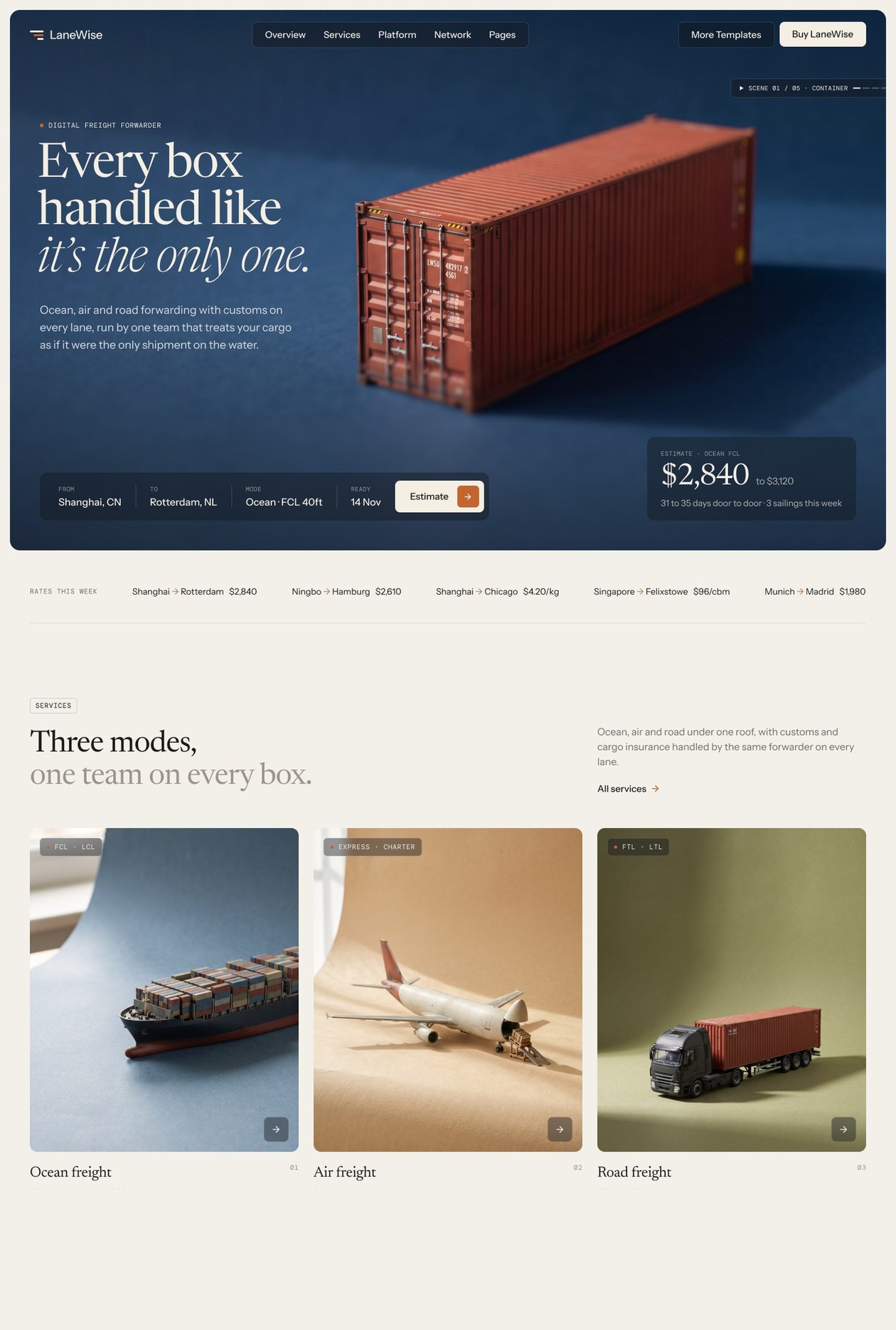
Best Webflow Templates for Freight Forwarders and Logistics Companies

What makes a Webflow template actually useful for a freight forwarder?
A useful freight forwarder template includes a quote request form with lane, cargo type and timing fields; a services structure organised by mode (ocean, air, road, customs, warehousing); a shipment tracking or status page; and case study or results pages with specific metric fields. Generic business templates include none of these out of the box.
Most Webflow templates in the "professional services" or "logistics" category were built for generic consulting firms or courier companies and retrofitted with a container ship image. They share the same structural problem: a single services page that lists everything in a bullet list, a contact form that asks for a message, and no page structure for lanes, case studies, or tracking. A freight forwarder who buys one of these templates still has to rebuild the site from scratch to make it work commercially.
The gap is not aesthetic - it is structural. A general business template does not know what a freight forwarder sells, who their buyer is, or what information a shipper needs before submitting a quote request. A template built for this vertical solves those problems before you open the Webflow editor.
How do the available logistics Webflow templates compare?
Below is a comparison of the Webflow templates most commonly considered by freight forwarders, 3PLs, and logistics companies. Evaluated on the structural criteria that matter for logistics commercial sites: quote form with lane fields, shipment tracking page, mode-based services structure, CMS collections for routes and case studies, and Figma source file included.
TemplatePriceQuote form (lane fields)Tracking pageMode-based servicesCMS collectionsFigma fileLaneWise by Loonis$129Yes - origin, destination, cargo type, weight, dateYes - milestone timeline with document fieldsYes - ocean, air, road, customs, warehousing4 (Services, Industries, Case Studies, Insights)Yes - included on requestGeneric logistics templates (Webflow Marketplace)$49-$79No - standard contact form onlyNoNo - single services list0-1 (blog only)RarelyProfessional services templates (repurposed)$79-$149NoNoNo1-2Sometimes
The gap between LaneWise and the rest is structural, not cosmetic. Generic templates can be reskinned to look like a freight forwarder site. They cannot generate quote requests, surface tracking milestones, or present services by mode without being rebuilt from the ground up.
Which template works best for a digital freight forwarder or 3PL?
LaneWise is the only Webflow template designed specifically for freight forwarders and 3PLs. It includes a two-minute quote form, a shipment tracking page with milestone timeline and document fields, four CMS collections, and 29 pages across three homepage layouts - all ready to customise without a developer.
For digital freight forwarders - companies running quote and booking flows without a physical branch network - LaneWise provides the page structure that converts visitors into enquiries: a lane network map, mode-specific service pages, an inline quote form on every services page, and case study pages with shipper result fields. These are not sections you can add to a generic template; they require a page architecture built around how a shipper evaluates a forwarder before making contact.
For 3PLs and NVOCCs, the industries section in LaneWise allows you to present vertical-specific capability (retail, automotive, pharma, perishables) separately from mode coverage. This matters because 3PL procurement is often industry-led: a shipper looking for a cold-chain partner searches by capability before searching by lane. LaneWise handles both entry points.
What should a logistics company look for in a website template?
Four criteria separate a purpose-built logistics template from a generic business theme repurposed with a container image.
Credibility signals built into the page structure. A lane network page or map that shows which trade corridors you actively serve answers the first question every shipper has before submitting an enquiry. Office location pages with local contact information signal network reach. Certifications and memberships (IATA, FIATA, AEO, C-TPAT) need a dedicated location in the layout, not a footer icon strip. If a template has none of these pages, you are adding them from scratch.
Conversion mechanics on every services page. A freight forwarder loses quote requests when the enquiry form only appears on the contact page. A useful template places a short quote form - or a direct link to one - at the bottom of every mode-specific services page, so a shipper who confirms you cover their lane can act immediately without navigating away.
Case study format with shipper results. B2B freight decisions are risk-sensitive. A case study page that names the shipper (or industry, if confidential), describes the lane and challenge, and states the result with a specific metric - transit time reduced, cost per tonne saved, on-time rate achieved - gives procurement teams the evidence to add you to a shortlist. A general testimonials page without metrics carries no weight in a freight evaluation.
Mobile-optimised tracking and quote flow. Shipment status checks and quote submissions increasingly happen on mobile - particularly for SME shippers and owner-operators managing freight from a phone. A template that does not optimise the tracking page and quote form for mobile is losing a significant share of the audience that uses those pages most.
Can you use a freight forwarder template if you also offer warehousing or customs brokerage?
Yes. LaneWise includes a services-by-mode structure where each service type (ocean, air, road, customs, warehousing) has its own page and CMS entry. You add or remove service pages without touching the template structure. The industries section lets you show vertical-specific capability separately from mode.
Customs brokers who do not offer freight forwarding can publish only the customs and compliance service pages and suppress the mode-specific ones. The CMS-driven navigation updates automatically to show only the published pages. NVOCCs can use the same structure to distinguish their asset-light model from carrier services without creating separate navigation items for each distinction.
Warehousing-led businesses - 3PLs whose primary commercial offering is fulfilment and storage rather than international transportation - can lead with the warehousing service page and treat ocean or air freight as secondary services. The template page hierarchy supports this without restructuring the design system.
In summary
- Freight forwarder templates must include quote forms with lane fields, mode-based services pages, and case study pages - most generic templates do not have any of these.
- The comparison field that matters most is whether the template was built for logistics or adapted from a general professional services theme.
- LaneWise is the only Webflow template built specifically for freight forwarders, 3PLs, and logistics startups - with a quote form, tracking page, and four CMS collections included.
- A Figma source file matters: it lets you brief a designer on brand and content changes without rebuilding the design from a screenshot.
- Most logistics websites that look similar were built on the same two or three generic themes - a specialist template is a visible differentiator on first impression and in organic search.
- Preview LaneWise at lanewise-freight-forwarders.webflow.io and get it at loonis.co/template/lanewise.
Is LaneWise suitable for a customs broker or NVOCC, or only for asset-based freight forwarders?
LaneWise works for any logistics business that needs to present services by mode, display a lane network, generate quote enquiries, and publish case studies with results data. Customs brokers, NVOCCs, 3PLs, and digital freight forwarders all use the same page structure. You select which service pages to publish and leave out those that do not apply - the CMS navigation updates automatically.
Can I use a freight forwarder Webflow template without a Webflow developer?
Yes, for content updates, CMS entries, and basic customisation. LaneWise is built on Webflow's visual editor with clearly labelled CMS collections for Services, Industries, Case Studies, and Insights. Adding routes, updating pricing, and publishing case studies requires no code. For layout changes or third-party integrations, the Loonis Pro plan delivers a configured site in five business days for $1,750 - details at loonis.co/customization.
Do I need to buy Webflow separately after purchasing LaneWise?
Yes. LaneWise is a Webflow site template - it runs inside your own Webflow account. After purchase you copy the template to your account and publish it to your domain. Webflow plans start from around $14/month for a basic CMS site. The $129 template price covers the Webflow site file and the Figma source file.
Is there a free version of LaneWise I can try before buying?
There is no free version, but you can preview every page at lanewise-freight-forwarders.webflow.io before purchase. A free Figma Community file showing the design system is also available if you want to explore the visual structure before committing.