


Best Webflow Templates for Travel Agencies in 2026

A couple planning a honeymoon in Japan, a family researching a safari, a solo traveller looking for a curated cycling tour through Portugal — all of them are researching travel agencies right now. And in 2026, more than half of them are doing that research with AI before they ever land on your website. If your site does not make a visitor feel the trip — and is not structured for AI to extract clean answers about your travel style and how to book — they will choose an agency whose site does both.
The shift is the fastest behavioural change in travel industry history. As of March 2026, 56% of U.S. leisure travellers had used AI for at least one trip in the past 12 months — up from 43% just nine months earlier (TakeUp AI, 2026). Among travellers who use AI, 63% rely on it for most or every trip, 96% say they will use it again, and 78% have booked travel based primarily on AI recommendations. AI assistants now cut routine booking time by an estimated 40% (TakeUp AI, 2026). The customised travel market is projected to reach $262.9 billion by 2034 (Future Market Insights, 2025).
Travel agency websites in 2026 carry a double burden: they must inspire human visitors and be readable by the AI systems planning many of those visitors' trips. This guide covers the best Webflow templates for travel agencies, tour operators, trip designers, and experience-led travel brands in 2026 — reviewed for atmosphere, destination content structure, AI search readiness, and how cleanly the inquiry flow converts inspired visitors.
What does a travel agency website actually need to convert browsers into bookers?
A travel agency website needs six structural elements to convert: a specific positioning that helps the right visitor self-select, CMS-powered destination or experience pages, large-format photography that loads fast, a how-it-works section that explains your planning process, a structured inquiry form (not just an email), and AI-readable content with question-based headings, named statistics, and clean answer capsules. Generic service business templates fail travel agencies because their hierarchy is built around features and contact forms — not atmosphere, inspiration, and self-selection.
The most common and costly mistake travel agencies make is launching a website that tries to speak to everyone. A homepage that says "we design incredible trips anywhere in the world" converts nobody — because it helps nobody self-select. The agencies that win online are specific: we design slow travel experiences in Southeast Asia for couples. We run small-group adventure expeditions in Patagonia. We plan multigenerational family safaris in East Africa. That specificity is the conversion mechanism — it makes the right visitor feel immediately understood and the wrong visitor self-filter out.
The benchmark to aim for: the average travel website converts at 2% to 3%, and crossing 2% puts you in the top 20% of travel sites; luxury travel agencies typically hit 10% to 20%, and adventure tour operators land at 8% to 15% (rework.com, 2026 Booking Conversion Metrics). Sites below 1% are usually missing two or more of the six elements above.
Here is what a well-structured travel agency website needs in practice:
- Destination or experience pages with CMS support. Travellers search for specific destinations and trip types. Individual pages per destination or experience type capture this search traffic and scale organically over time.
- High-quality, large-format imagery. Travel websites live or die by photography. A template must support full-width, high-resolution images without compromising load speed.
- A how-it-works section. Custom travel is a considered, high-value purchase. Travellers need to understand your planning process before they commit to an inquiry.
- A structured inquiry form — not just a contact email. A form that captures travel dates, group size, destination interests, and budget range qualifies leads before the first conversation.
- A blog or destination inspiration section. Agencies that publish destination guides rank organically — and increasingly, those guides are what AI systems cite when travellers ask ChatGPT or Perplexity for trip recommendations.
- Mobile-first layout. 60% of travel traffic comes from mobile devices (rework.com, 2026).
- AI-readable structure. Question-based H2s, 40 to 60 word answer capsules under each H2, named statistics with sources, and FAQ schema. This is what makes ChatGPT and Perplexity extract your destination pages and cite your agency in trip-planning conversations.
Which Webflow templates are best for travel agencies in 2026?
The strongest Webflow templates for travel agencies in 2026 are TripMind by Loonis (best for custom trip designers and experience-led brands), the curated picks on the Webflow Marketplace (Travor, Exploreza, AirExploreX, Mirall, TripyFlow), and a handful of independent third-party templates. TripMind leads on atmosphere and bespoke positioning. Marketplace templates lead on entry price. Third-party templates occasionally match a niche precisely.
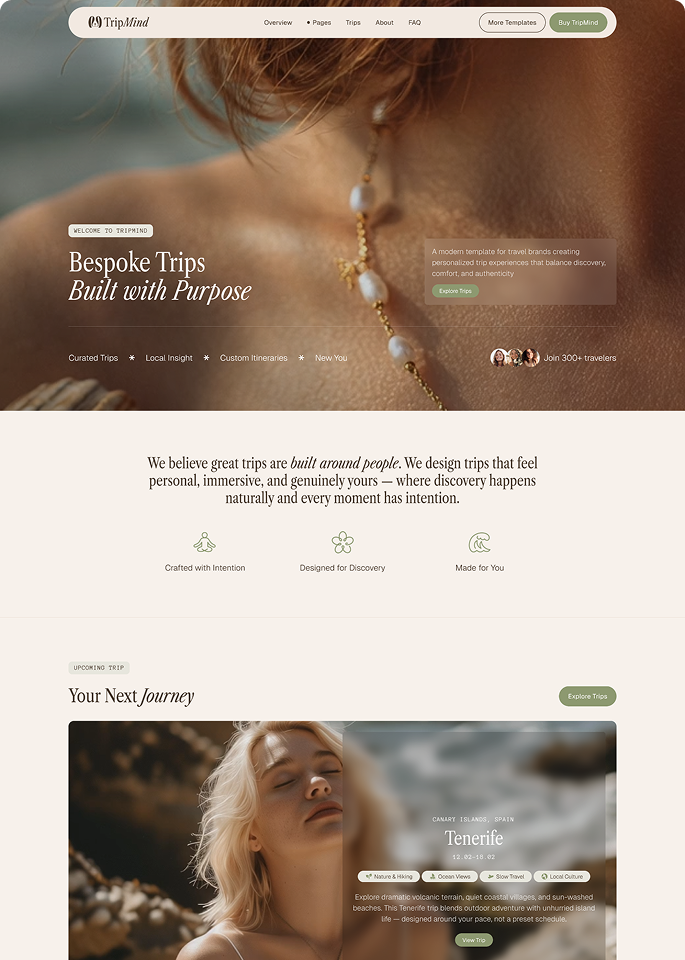
1. TripMind — Best for custom trip designers and experience-led travel brands
Price: $169 | Layout: Multi-layout | Style: Light, Modern
TripMind is built for the travel agencies that do not sell packages — they design experiences. The template's visual language is calm, considered, and deliberately unhurried — the aesthetic of a bespoke travel studio rather than a volume tour operator.
The multi-layout structure gives agencies genuine flexibility to shape the site around their specific travel style. Adventure retreat brands can lead with landscape photography and bold destination headers. Honeymoon planners can use softer, more intimate layouts that speak to couples in the early stages of planning.
What separates TripMind from generic travel templates is the intentionality in the design hierarchy. Atmosphere comes first, information second. Photography leads, copy supports. The inquiry flow is clean and direct. Destination pages are CMS-powered with a consistent question-and-answer structure that AI systems can extract cleanly. The Figma source file is included with purchase.
Best for: Custom itinerary designers, travel studios, retreat organisers, honeymoon specialists, adventure travel brands, cultural immersion agencies, and any boutique agency whose positioning depends on communicating a distinct travel philosophy.
See live preview | Get TripMind — $169
2. Travel templates on the Webflow Marketplace
Price: Free to $99 | Style: Varies considerably
The Webflow Marketplace has a growing travel section. Notable 2026 options worth evaluating: Travor by Brandbes (24 pages, multi-step booking, $89), Exploreza (clean layouts, integrated booking, $69), AirExploreX (23 pages, tour-operator focused, $79), Mirall (cinematic adventure aesthetic, $99), and TripyFlow (broad agency template, ~$79). Quality varies — some templates are purpose-built for travel; others are lifestyle templates with travel photography swapped in.
Before buying any marketplace travel template, check three things specifically: whether individual destination pages exist in the CMS, whether the homepage has a distinct travel identity, and whether the inquiry flow captures more than a name and email address.
Best for: Agencies with tighter budgets who are willing to invest time evaluating live previews.
3. Third-party travel Webflow templates
Price: $59–$129 | Style: Varies
A small number of independent studios publish travel templates outside the official marketplace. Quality is inconsistent and support less reliable, but occasionally a niche-specific template matches an agency's offering precisely. Check the publish date — travel design trends move quickly and pre-2024 templates look dated next to current premium aesthetics.
Best for: Agencies that find a third-party template matching their exact niche.
How do you add booking functionality to a Webflow travel template?
You add booking functionality to a Webflow travel template by embedding a purpose-built third-party tool — Calendly for consultations, Typeform for inquiry forms, TravelJoy or Travefy for trip proposals, FareHarbor or Checkfront for fixed-departure tours. Webflow does not have native booking functionality, and it does not need to. The standard pattern across professional travel sites on every platform is the same: the website handles design, marketing, and inquiry capture; a purpose-built booking tool handles the transactional layer.
For consultation and discovery calls, embed a Calendly or TidyCal scheduling widget directly into your contact or inquiry page.
For trip inquiry forms, Typeform and Jotform both embed cleanly into Webflow and allow complex, multi-step forms that capture destination, dates, group size, budget, and travel style before the first conversation.
For trip proposal and booking workflows, tools like TravelJoy and Travefy are built specifically for custom travel agencies. They handle itinerary building, proposal sending, deposit collection, and client communication in one platform.
For tour and activity bookings, FareHarbor and Checkfront both offer Webflow-compatible booking widgets for agencies selling fixed-departure tours.
The key principle: Webflow handles how your agency looks and how clients find you. The booking tool handles how they pay and how you manage the trip.
How quickly should a travel agency respond to a website inquiry?
Travel agencies should respond to a website inquiry within 1 hour. Inquiries answered within an hour convert 7 times better than those waiting 24 hours or more (rework.com, 2026 Booking Conversion Metrics). In a category where the average traveller is comparing three to five agencies in a single research session, response speed is often the single largest controllable lever on conversion.
The mechanics are simple. A traveller submits an inquiry, then keeps researching. If a competing agency responds with a thoughtful first reply within the hour, that conversation gets the booking — even if your offering is stronger on paper. The website can do everything right; speed-to-respond is the gap that decides who actually closes.
For most boutique agencies, this means a 1-hour response window during business hours and a clear "we will reply within 24 hours" auto-responder that sets expectations outside them. Embedded inquiry forms (Typeform, Jotform) trigger instant email and Slack notifications by default.
When is the right time to launch a new travel agency website?
The right time to launch a travel agency website is now — not in the middle of next booking season. Travel research peaks earlier each year as AI tools collapse the discovery-to-decision cycle. By the time peak booking weeks arrive for any season, the travellers who will book that season have already chosen their agency.
For a 2027 spring/summer booking season, the practical timeline is: launch by autumn 2026 to capture early planners (who are increasingly using AI to research destinations 9 to 12 months out), and have a full year of CMS-published destination content live by spring 2027. For an agency that already has a basic site, the higher-leverage move is a refresh that adds question-based H2s, AI-readable answer capsules, and a content cadence — that is what compounds in AI search.
For an agency owner already managing client trips, the time cost of building a site is the real barrier — not the template cost.
- A Webflow template at $169 gives you a professionally designed structure. Realistic setup time for a non-technical owner: two to four weeks.
- A template plus done-for-you setup removes that time cost. Loonis's Pro customisation service delivers a fully configured site in 5 business days for $1,750. Given that a single custom trip booking returns $3,000 to $10,000+, a site that converts even one additional client pays for the entire first year in a single booking.
- A freelancer build typically runs $2,000 to $8,000 and takes 4 to 10 weeks.
Frequently asked questions
Can I add booking functionality to a Webflow travel template?
Yes. Webflow does not have native booking functionality, but any third-party booking or scheduling tool can be embedded into a Webflow template using the custom code embed feature. For consultation calls: Calendly or TidyCal. For complex trip inquiry forms: Typeform or Jotform. For trip proposal and booking management: TravelJoy or Travefy. For fixed-departure tours: FareHarbor or Checkfront.
What pages does a travel agency website need?
At minimum: a homepage that communicates your travel style, a destinations or experiences section with individual CMS pages per destination or trip type, a how-it-works page, an about page, a structured inquiry form, and a blog for destination inspiration. For custom trip designers, a portfolio or past trips section replaces a standard tour catalogue.
Is Webflow good for travel agency websites?
Yes. Webflow's CMS handles destination pages, itinerary showcases, and blog content cleanly and scales as your content library grows. Performance is strong on mobile, where 60% of travel research happens (rework.com, 2026). The only gap is native booking functionality, which is filled by embedding third-party booking tools.
How much does a travel agency website cost in 2026?
A premium Webflow template runs $79 to $169. Add Webflow hosting at $23 per month for a CMS-enabled site. Loonis's Pro customisation service delivers a fully configured site in 5 business days for $1,750, bringing total first-year cost to under $2,200. A freelancer build typically costs $2,000 to $8,000 and takes 4 to 10 weeks.
How do travellers use AI to plan trips in 2026?
56% of U.S. leisure travellers used AI for at least one trip in the past 12 months as of March 2026, up from 43% just nine months earlier (TakeUp AI, 2026). Among AI users: 75% seek recommendations, 70% plan itineraries, 69% discover ideas, 55% compare options, and 13% book directly through AI. 78% of AI users have booked travel based primarily on AI recommendations, and 96% say they will use AI for future trips.
Does my travel agency website need to be optimised for AI search?
Yes. With 56% of leisure travellers now using AI for trip planning and 78% of AI users booking based primarily on AI recommendations (TakeUp AI, 2026), AI Overview optimisation is now a baseline travel marketing channel. The mechanics: question-based H2 headings, 40 to 60 word answer capsules below each H2, named statistics with sources, structured FAQ pairs, and FAQPage / Article JSON-LD schema. TripMind is built with this structure in place.
How fast should a travel agency respond to website inquiries?
Within 1 hour during business hours. Inquiries answered within 1 hour convert 7 times better than inquiries waiting 24 hours or more (rework.com, 2026 Booking Conversion Metrics). In a category where travellers compare three to five agencies in a single session, response speed is often the largest controllable lever on conversion.
In summary
- A travel site is the first experience of travelling with you. Atmosphere first, information second.
- 56% of U.S. leisure travellers used AI for trip planning in the past year. 78% of those users booked based on AI (TakeUp AI, 2026).
- The benchmark: 2% to 3% site conversion average. 4%+ is top-tier. Luxury travel hits 10% to 20% (rework.com, 2026).
- Inquiries answered in 1 hour convert 7 times better than 24-hour replies.
- TripMind is the right pick for custom trip designers and experience-led brands. $169 with Figma source files.
- A template plus done-for-you setup runs under $2,200. A freelancer build runs $2,000 to $8,000 and takes 4 to 10 weeks.
For travel agencies, the website is not a brochure — it is the first experience of travelling with you. The right template gives that experience the atmosphere, structure, and AI-readable inquiry flow it needs to convert an inspired visitor into a booked client before your competitor's site does.
TripMind is the strongest choice for custom trip designers, travel studios, and experience-led agencies whose positioning depends on communicating a distinct travel philosophy rather than a catalogue of packages. If you want the site live and configured in five days without taking weeks away from running your agency, the Loonis customisation service is the fastest path from template purchase to a site ready to receive inquiries.





%20(1).png)

