Best Webflow Templates for Private Clinics and Medical Practices

A private clinic website does one job before anything else: turn an uncertain visitor into a booked consultation. That means patients need to see your treatments, meet your specialists, understand your pricing, and request a booking without confusion.
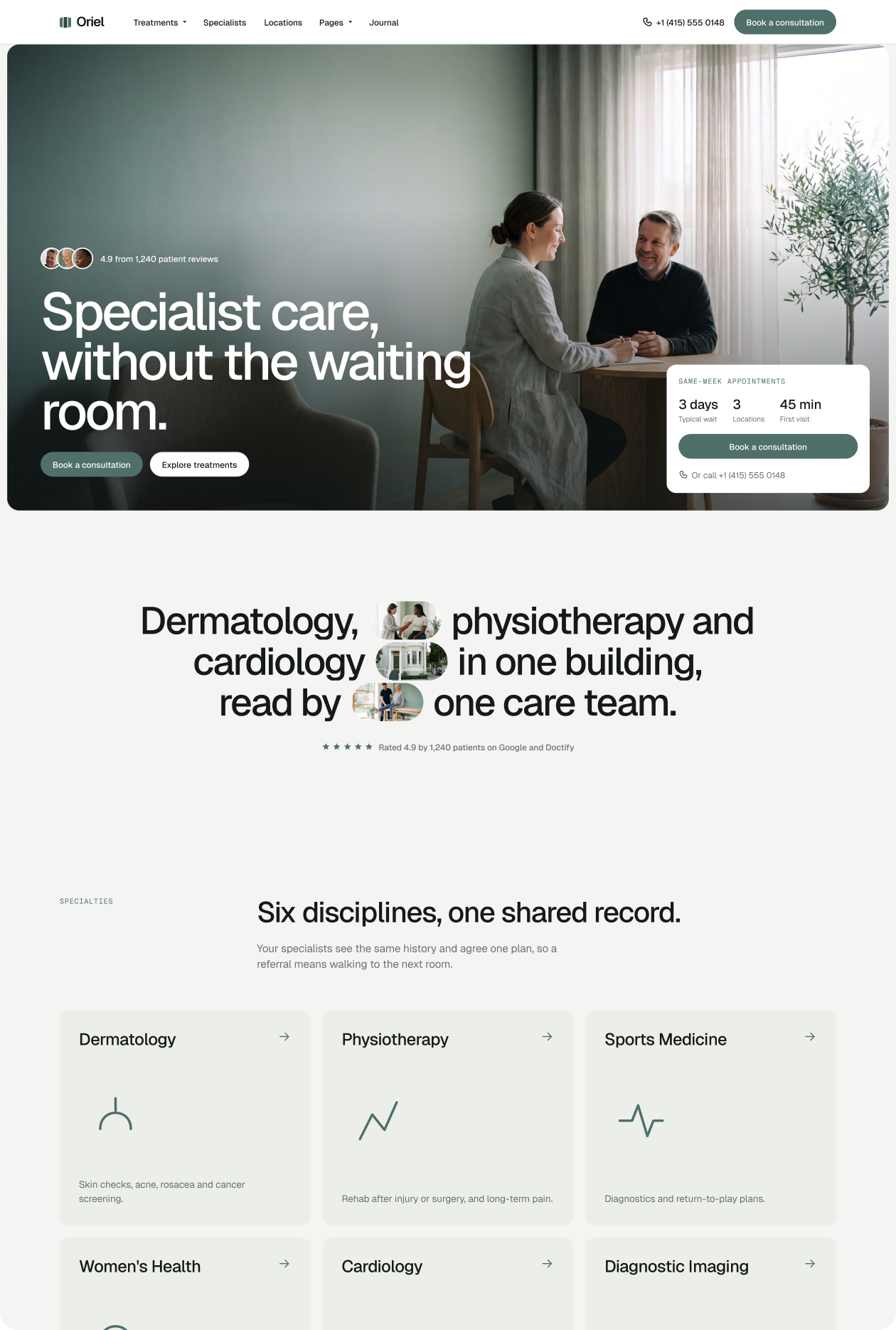
Oriel is built specifically for that job. It is a calm, grid-led Webflow template for private clinics and specialist practices, with 23 pages, four CMS collections, and three different booking request flows built in from day one.
This guide covers what a clinic website needs to convert patients in 2026, how the main Webflow template options compare, and when Oriel is the right choice.
If you run a coaching or therapy practice rather than a clinical one, see our guide to Webflow templates for health coaches and therapists instead.
What pages does a private clinic website need?
A clinic website needs a home page, a treatments or services index, individual treatment detail pages, a specialists or team page, a booking or contact page, and a pricing or insurance page. Clinics with multiple locations need a locations page. Patient testimonials and a patient guide for new visitors also lift conversion rates.
A well-structured clinic site gives patients a clear path: discover the treatment they need, verify that the clinic can deliver it, and book a consultation. Most templates skip one or more of these layers and force you to build them from scratch.
Oriel includes all of them. Its 23 pages cover:
- Home (3 variants) to test different hero approaches
- Treatments (3 variants) plus a Treatment Detail page with duration, price, and linked specialists
- Specialists + Specialist Detail with credentials and languages
- Book (3 booking variants) for different consultation flows
- Locations for multi-site practices
- Pricing and Insurance for transparent fee structures
- Patient Stories for social proof
- Patient Guide for first-time visitors
- Journal + Article Detail for SEO content
What do patients look for on a clinic website?
Patients visiting a clinic website look for five things: a clear list of treatments with descriptions, visible specialist credentials, transparent pricing, an easy way to book or enquire, and signals that the clinic is trustworthy. Sites that hide prices or make booking hard see significantly lower conversion rates.
Research from Orbit Media and Union MD confirms the pattern: patients now arrive having already researched their condition. They are choosing between practices, not between treatments. Your website needs to answer why your clinic is the right one.
The five conversion signals patients check:
- Treatment clarity - what the treatment involves, how long it takes, what it costs
- Specialist credentials - qualifications, experience, languages spoken
- Pricing visibility - an honest price range removes the first barrier to booking
- Booking ease - a booking request form that asks only for contact details and preferred times
- Trust markers - patient testimonials, accreditations, before/after photos where appropriate
Oriel's CMS stores treatment duration, price, linked specialists, and patient FAQs for every treatment. These surface automatically on Treatment Detail pages without any manual coding.
Do Webflow clinic templates include booking functionality?
Webflow templates can include booking request forms that collect a patient's name, contact details, and preferred appointment time. These are appropriate for initial enquiries. Full appointment scheduling with calendar management requires a third-party integration, and any system that handles protected health information must be HIPAA-eligible.
Most clinic templates include a basic contact form and call it a booking page. Oriel offers three distinct booking flows:
- Book A - simple consultation request (name, contact, preferred time)
- Book B - treatment-specific request with a dropdown for the treatment area
- Book C - multi-specialist routing for practices where patients choose their specialist
All three forms collect only contact details and scheduling preferences. They do not collect symptoms, diagnoses, or treatment reasons. That keeps them outside HIPAA's scope for PHI.
For full calendar scheduling, link one of these pages to a tool like Calendly, Jane App, or Cliniko using a simple embed or button.
Is Webflow HIPAA compliant for clinic websites?
Webflow is not HIPAA certified and does not offer a Business Associate Agreement (BAA). A marketing website built on Webflow that does not collect protected health information (PHI) typically falls outside HIPAA's scope. Any form that collects symptoms, diagnoses, or treatment details should be routed through a HIPAA-eligible platform, not a native Webflow form.
This is the most important technical question for any clinic building on Webflow. Here is what the current evidence says:
What Webflow can handle safely:
- Your marketing site, treatment pages, and specialist profiles
- Booking request forms that collect name, contact details, and preferred appointment time
- A patient guide, journal, or educational content
What Webflow should not handle:
- Intake forms collecting symptoms, medications, or reason for visit
- Patient portals or health records
- Secure messaging between patient and clinician
The recommended architecture for private clinics:
Use Webflow for your public marketing site. Route all clinical data through a dedicated tool that signs a BAA and meets HIPAA requirements, such as Jane App, Cliniko, SimplePractice, or a similar practice management platform. Link from your Webflow booking page to the external scheduling tool.
This split is standard practice for healthcare marketing sites in 2026. Webflow itself notes on its security page that "marketing and informational sites usually don't handle sensitive data, so they typically fall outside HIPAA's scope."
How much does a private clinic website cost in 2026?
A private clinic website built on a Webflow template costs between $129 and $499 for the template, plus Webflow hosting from $14 per month. A fully customized clinic site built from a template by a specialist studio costs $1,750 to $2,900. A fully custom Webflow build costs $5,000 to $20,000 or more.
The three tiers most clinic owners choose between:
Template only (DIY): $129-$499 for the template, then you customise it yourself in Webflow. Total outlay is low; timeline depends on your availability. Oriel is $129 with the Figma source file included.
Template plus customization: You buy the template, then hire a studio to populate it with your content, configure your brand, and set up your CMS. Loonis Pro Customization starts at $1,750 with 5-day delivery. That covers branding alignment, content updates, navigation and footer, and up to four new sections.
Full custom build: Best for large multi-location groups or clinics with unusual technical requirements. Budget $5,000 minimum and several weeks of build time.
Most independent clinics and specialist practices launch successfully on a $129 template with professional customization, bringing total cost to around $1,879 before hosting.
Want it launched for you? Our team customizes Oriel in 5 days.
Which Webflow templates work best for private clinics?
The best Webflow templates for private clinics include dedicated page structures for treatments, specialists, and booking flows. Generic business or SaaS templates lack these and require significant rework. Purpose-built clinic templates with CMS collections for treatments and specialists save the most time.
Here is how the main options compare:
Generic templates require you to rebuild the treatment CMS, specialist pages, and booking flows from scratch. Purpose-built clinic templates like Oriel include these structures already. The difference in setup time is typically 10 to 20 hours.
Oriel is the strongest purpose-built option for private clinics, specialist practices, dental and dermatology clinics, physiotherapy centres, and multi-location medical groups. View Oriel at loonis.co/template/oriel for $129 with the Figma source file included.
How long does it take to launch a clinic website on Webflow?
A clinic website built from a Webflow template takes one to two weeks to launch if you have content ready. If a studio handles the customization, delivery is typically five to eight business days. The main delays are gathering treatment content, specialist bios, and photos, not the technical build.
A realistic launch timeline for a clinic using Oriel:
- Day 1: Purchase template, access Figma source file, confirm page structure
- Days 2-3: Prepare content (treatments list, specialist bios, pricing, photos)
- Days 4-6: Populate CMS in Webflow, customise brand colours and typography
- Days 7-8: Test booking forms, set up Webflow hosting, point domain
- Day 9-10: Review and launch
If you hand the build to Loonis, our Pro Customization delivers a content-populated, brand-configured site in 5 business days. See customization options.
What CMS collections does a clinic website need in Webflow?
A clinic website in Webflow needs CMS collections for treatments, specialists, and locations at minimum. Treatments should store duration, price range, linked specialists, and patient FAQs. Specialists should store credentials, languages, and booking links. A journal or articles collection adds ongoing SEO value without manual page creation.
Oriel ships with four CMS collections ready to populate:
- Specialties - organises treatments by clinical area (dermatology, physiotherapy, etc.)
- Treatments - stores duration, price, specialty, linked specialists, and patient FAQs per treatment
- Specialists - stores credentials, languages spoken, and booking links per specialist
- Articles - powers the Journal section for SEO content
This structure means treatment pages, specialist profiles, and specialty overview pages all update dynamically from the CMS. Add a new specialist to the CMS and they appear on the correct specialty page, the treatments they offer, and the specialists directory automatically.
In summary
- A private clinic website needs dedicated pages for treatments, specialists, pricing, locations, and booking to convert patients effectively.
- Patients look for five things: treatment clarity, specialist credentials, visible pricing, easy booking, and trust signals.
- Webflow is suitable for clinic marketing sites and booking request forms that collect only contact details. Clinical intake requiring PHI needs a HIPAA-eligible platform.
- A purpose-built template like Oriel saves 10 to 20 hours of setup time compared to adapting a generic business template.
- Total cost to launch on Oriel with professional customization is around $1,879 for a 5-day delivery.
- Oriel includes 23 pages, 4 CMS collections, and 3 booking flows designed specifically for private clinics.
View the Oriel template - $129, Webflow + Figma included.**