





How do I download a template I bought?
ANSWER
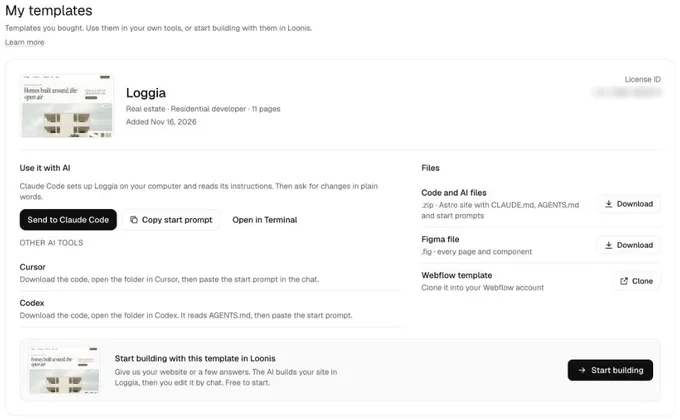
Open My templates in your Loonis account. For each template you bought, you can download the code with AI tool files and the Figma file, clone the Webflow version, or click "Send to Claude Code".
Steps
- Open the email "(template) is yours" and click "Open My templates". The button works for 14 days. After that, log in at app.loonis.co with the email you used at checkout and open "My templates".
- Code and AI files: click "Download" next to "Code and AI files".
- Claude Code: click "Send to Claude Code". In Claude, pick an empty folder and press Enter. Claude downloads the template, unzips it and reads its instructions.
- Figma: click "Download" next to "Figma file".
- Webflow: click "Clone" next to "Webflow template" to copy it into your Webflow account.
Good to know
- Nothing opened in Claude? Click "Copy start prompt" and paste it into Claude Code yourself.
- Cursor or Codex: download the code, open the folder, then paste the start prompt in the chat.
- A download link works for 1 hour and up to 3 downloads. Click again to make a new one.
- On a phone, click "Email me the link for my computer".
- Your template shows once your email is confirmed. Each template is for one project. See the template license.
Still stuck?
Email hello@loonis.co, we reply within 2 business days.