





How do I connect my own domain to Loonis?
ANSWER
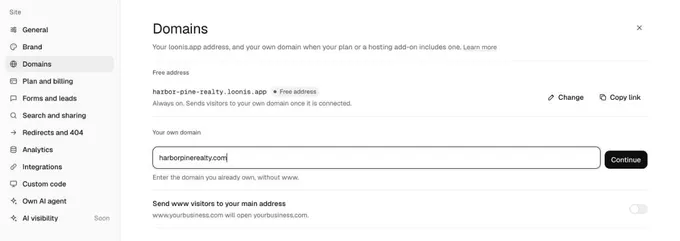
On Pro or Premium, or with the $15 hosting add-on, open Site settings, Domains in the Loonis editor, enter your domain and add the settings Loonis shows where you manage your domain. Loonis turns on a secure connection (SSL) for you.
Steps
- In the editor, open Site settings and click "Domains". Or click "Connect yours" next to "Custom domain" in the Publish menu.
- Under "Your own domain", type your domain without www, for example yourbusiness.com, and click "Continue".
- Loonis shows where your domain is managed, for example "Managed at GoDaddy". Click "Set it up myself".
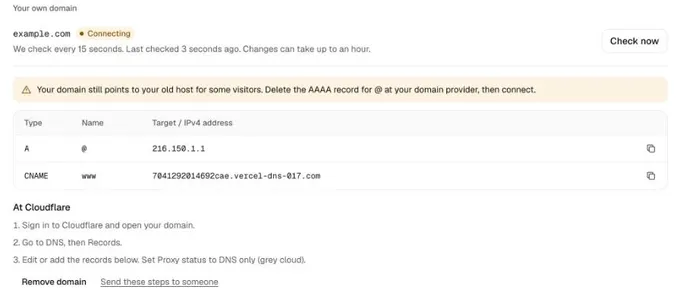
- Loonis shows the exact records to add, usually an A record for @ and a CNAME record for www, with steps for your provider. Each record has a copy button. Use the values Loonis shows for your domain.
- Sign in where you manage your domain and add these records. If one with the same type and name is already there, change it instead. On Cloudflare, set Proxy status to DNS only (grey cloud).
- Wait for "Connected". While it says "Connecting", Loonis checks every 15 seconds, and it can take up to an hour. Click "Check now" to check at once.
- Publish your site to make it live on your domain.
Good to know
- Pro includes 1 own domain and Premium 3. On Free, add hosting for this site for $15 a month.
- You need a confirmed email to connect a domain.
- Someone else manages your domain? Click "Send these steps to someone".
- If Loonis says your domain still points to your old host, delete the AAAA record for @ at your domain provider, then connect.
- "Send www visitors to your main address" turns on when you add a domain.
- Was your domain used in another Loonis account before? Loonis also asks for a TXT record that starts with _loonis.
- Typed the wrong domain? Click "Remove domain" and start again.
Still stuck?
Email hello@loonis.co, we reply within 2 business days.