





How do I publish my Loonis site?
ANSWER
Click "Publish" in the Loonis editor's top bar, check your free address and click "Publish". Your site goes live in up to two minutes, on name.loonis.app or your own domain.
Steps
- Build your site first. Before the first build, Publish is dimmed.
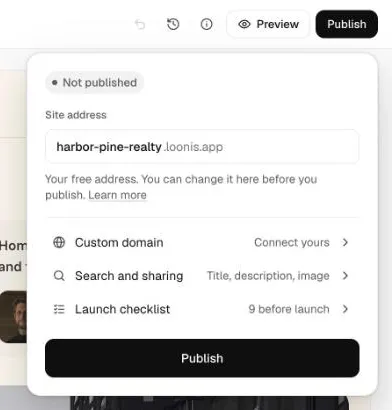
- Click "Publish" in the top bar.
- The first time, check "Site address". Loonis fills it in from your business name, followed by .loonis.app. You can change it here: 3 to 40 letters, numbers and single dashes.
- Check the rows: "Custom domain", "Search and sharing" and "Launch checklist".
- Click "Publish". It can take up to two minutes, and you can keep editing.
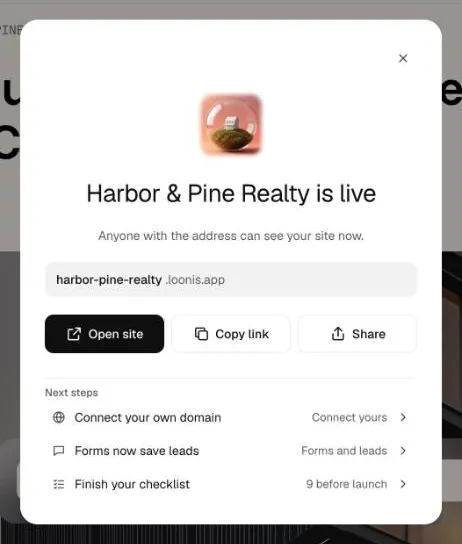
- When your site is live, click "Open site", "Copy link" or "Share".
Good to know
- You need a confirmed email to publish.
- Open Launch checklist items never block publishing.
- After a change, click "Publish" again. The popover lists what changed since the last publish.
- A free account publishes one site on its loonis.app address. To publish another, choose a plan or add hosting for $15 a month.
- After your first publish, you change the free address in Site settings, Domains. Links to the old address stop working.
Still stuck?
Email hello@loonis.co, we reply within 2 business days.