





What is the Launch checklist in Loonis?
ANSWER
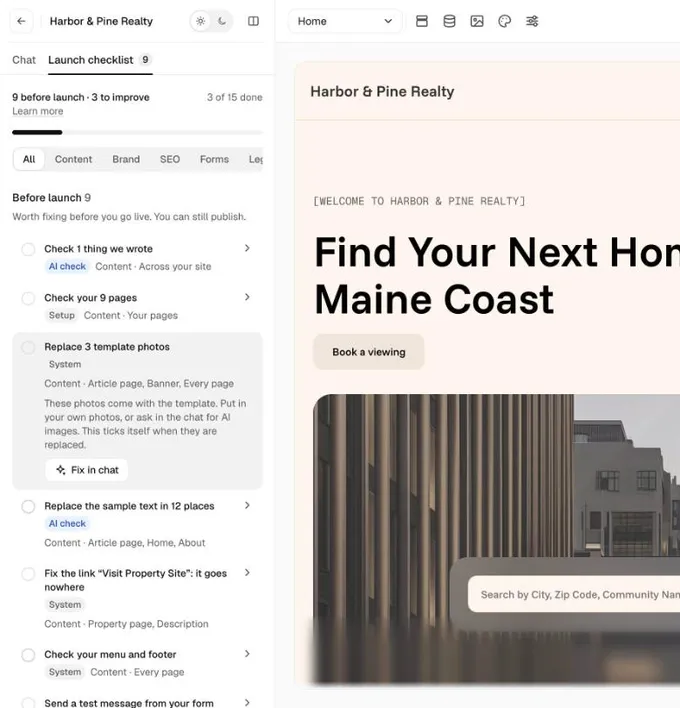
The Launch checklist is a tab next to Chat in the Loonis editor. It lists what to check or fix on your site, like facts to confirm and template photos to replace. It never blocks publishing.
What's on it
- Before launch: worth fixing before you go live. You can still publish. The number on the tab counts these.
- Improve later: makes your site better. Do these any time.
For example: "Replace N template photos", "Replace the template's sample text in N sections", "Replace N sample emails and phone numbers", "Fix N links that go nowhere", "Check your menu and footer" and "Send a test message from your form".
Steps
- Click "Launch checklist" next to Chat.
- Click an item to open it. It says what to do and which pages it's on.
- Fix it on the page, or click "Fix in chat". Items tied to one spot also have "Show me", which opens that spot on your site.
- For "Check N things we wrote", click "It's right" or "Change it" for each fact.
- Tick the item when it's done. You have 3 seconds to undo. Some items tick themselves once fixed.
Good to know
- You can publish with open items. The Publish menu shows how many are left before launch.
- Loonis checks again after every change, so new items can show up.
- When everything is done, you see "Ready for launch".
Still stuck?
Email hello@loonis.co, we reply within 2 business days.