





How do I change my site by chat?
ANSWER
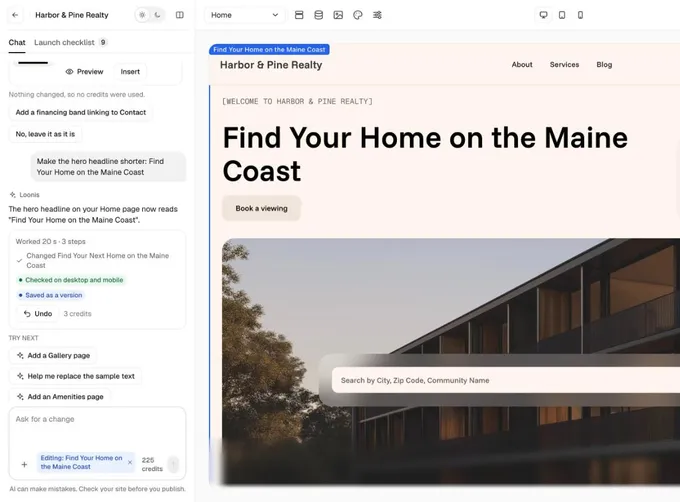
Type what you want in the Loonis chat. The AI makes one change at a time, checks it on desktop and mobile, and saves it as a version you can undo.
Steps
- Click the box "Ask for a change" and describe the change in plain words, for example "Make the hero headline shorter".
- To change one section only, click it and choose "Ask AI". The chip "Editing: ..." shows in the chat box with the section's name. Click × on the chip to clear it.
- Send your request. The "Working on it" card shows each step. Click "Stop" any time.
- Read the reply: what changed, "Checked on desktop and mobile" and "Saved as a version". The credits used show next to "Undo".
- If a request is big, Loonis shows an estimate first. Click "Go ahead" or "Not now".
Good to know
- If nothing changed, no credits are used. If a change fails, your credits come back.
- You can add your next request while one runs. It waits its turn.
- The chat can't add scripts, tracking or payments. On Pro and Premium, you can add scripts yourself in Site settings, Custom code.
Still stuck?
Email hello@loonis.co, we reply within 2 business days.