





How do I undo a change or restore an older version?
ANSWER
Click "Undo" in the Loonis editor's top bar, or press Cmd+Z (Ctrl+Z on Windows), to take back your latest change. To go back further, restore an older version from Version history.
Undo your latest change
- Click "Undo" in the top bar, or press Cmd+Z (Ctrl+Z on Windows).
- Loonis saves the undo as a new version, so nothing is lost.
Restore an older version
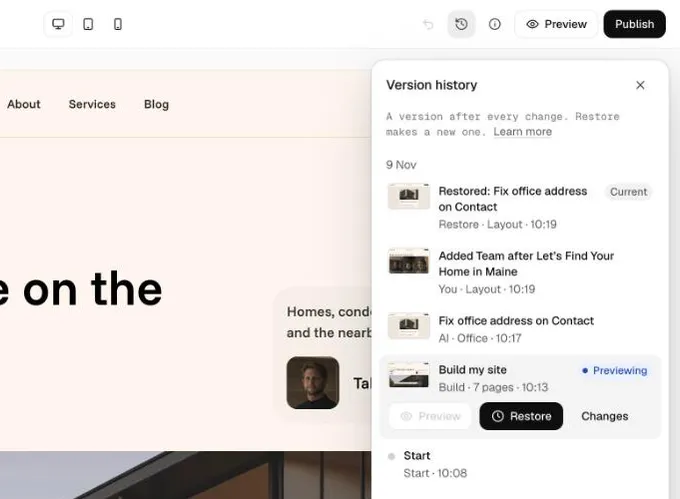
- Click "Version history" (the clock icon) in the top bar.
- Pick a version. They're grouped by day and show who made each one: you, the AI, the build or your own agent.
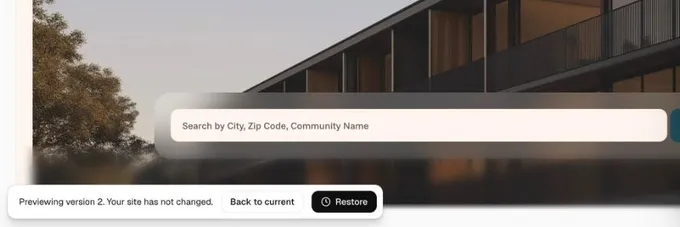
- Click "Preview". Your site doesn't change while you look.
- Click "Restore". Loonis saves it as a new version, "Restored: ...".
- Changed your mind? Click "Back to current".
Good to know
- Undo takes back only your latest change. There's no Redo.
- While you're typing, Cmd+Z undoes your typing instead.
- Undo doesn't give credits back.
- Restoring a version also brings back its Launch checklist items.
- Published versions are always kept.
Still stuck?
Email hello@loonis.co, we reply within 2 business days.