





How do I add a new page?
ANSWER
Open the page menu in the Loonis editor's top bar and click "New page". Describe the page and the AI builds it (6 credits), add a page from your template for free, or start a blank page for free.
Steps
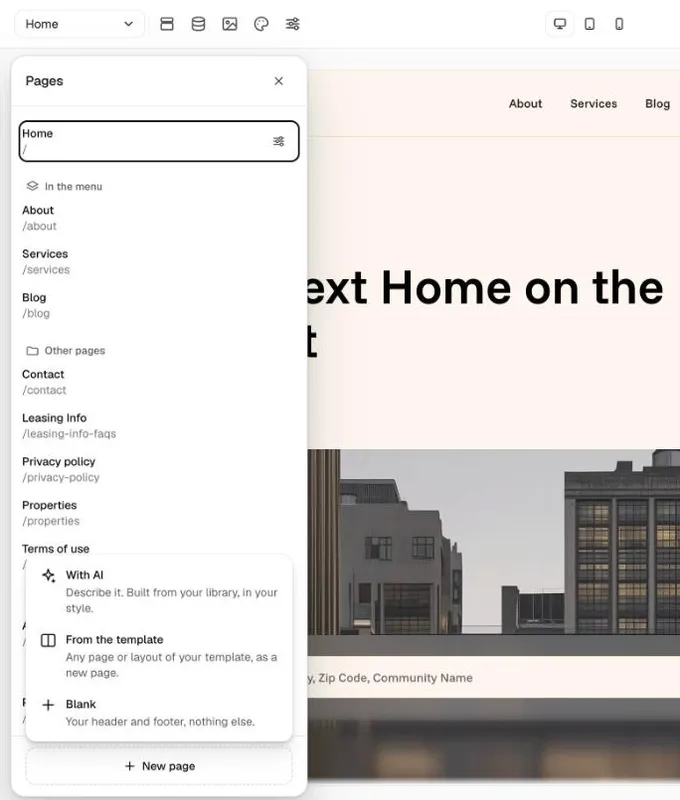
- Click the page menu at the top left of the editor (it shows the page you're on). The Pages panel opens.
- Click "New page" at the bottom and pick one of three ways:
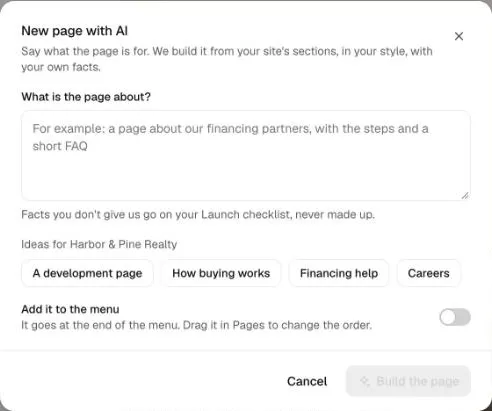
- With AI: say what the page is about, or pick an idea for your business. Switch on "Add it to the menu" if you want it there. Click "Build the page". This uses 6 credits.
- From the template: pick any page or layout of your template. It comes with the template's sample text, and each sample part goes on your Launch checklist. Free.
- Blank: your header and footer, nothing else. Add sections from the library. Free.
- The new page opens when it's ready. Change its name, address and search settings with the settings icon on its row in Pages.
Good to know
- The AI uses only the facts you give it. Anything missing goes on your Launch checklist, never made up.
- A new page goes at the end of the menu. Drag it in Pages to change the order.
- Pages per site: Free 20, Pro 30, Premium 50.
Still stuck?
Email hello@loonis.co, we reply within 2 business days.