





How do I add AI images to my site?
ANSWER
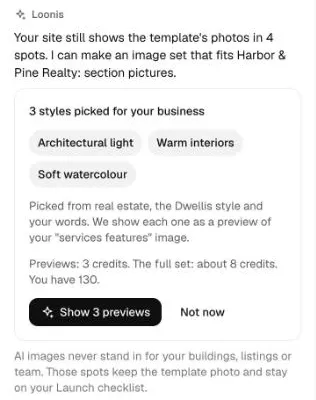
After your build, Loonis can fill the spots that still show template photos with an AI image set, in one of 3 styles picked for your business. Previews use 3 credits, and the full set's cost shows before it runs.
Steps
- Under your build summary, click "Fill N photo spots with AI images". Or ask for it in the chat.
- Loonis shows 3 styles picked from your industry, your template and your words, with the cost: "Previews: 3 credits. The full set: about N credits."
- Click "Show 3 previews" to see one picture in each style. Not sure? Click "Not now".
- Pick a style, or ask for 3 other styles.
- Make the set. You can keep editing while it runs. The images go on your site together as one version, so one Undo takes them all back.
Good to know
- AI images never stand in for your buildings, listings, projects or team. Those spots keep the template photo and stay on your Launch checklist.
- Your own photos always win. Spots with your photos are never changed.
- For medical, real estate and construction sites, the images show no people. For investment sites, no charts or numbers.
- Want one image again? Ask in the chat.
Still stuck?
Email hello@loonis.co, we reply within 2 business days.