





What's in the first build, and how do I add the rest?
ANSWER
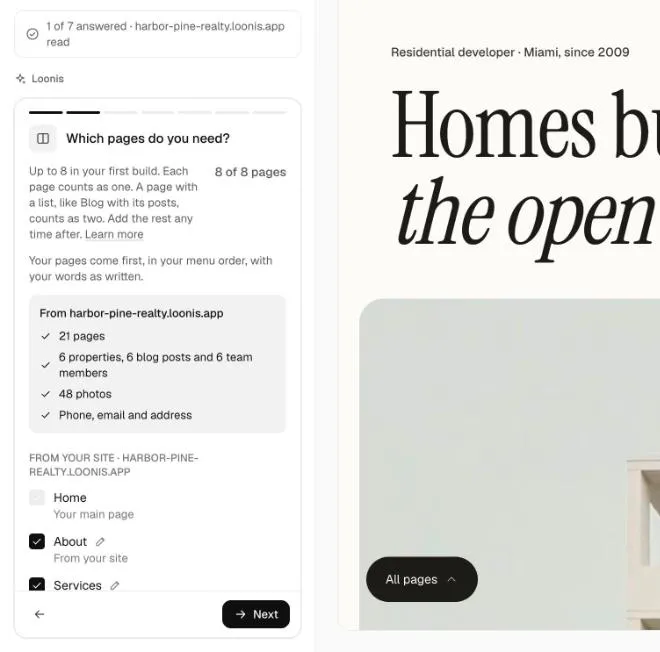
Your first Loonis build includes up to 8 pages and lists, with up to 9 items in each list. You add the rest after the build with "Add the rest", which shows its credit cost before it runs.
How the 8 are counted
- Each page counts as one, Home included.
- A list the build fills, like blog posts, listings or floor plans, counts as one more. So Blog with its posts counts as two.
- Your privacy and terms pages are always built and don't count.
- Each list brings its 9 newest posts, or its first 9 items.
Steps to add the rest
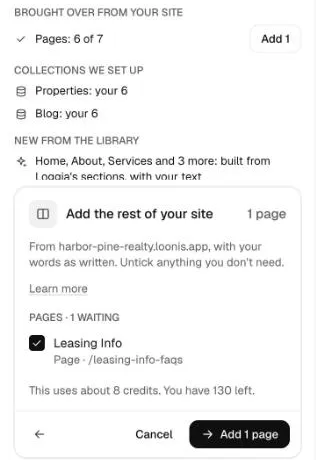
- Start "Add the rest" in one of three places: the "Add" button under "Brought over from your site" in the build summary, the "Add the rest" item on your Launch checklist, or type "add the rest of my posts" in the chat.
- On the "Add the rest of your site" card, untick anything you don't need.
- Check the line "This uses about N credits. You have N left."
- Click "Add N pages and N items". It takes a few minutes, and you can leave the page.
- Everything is saved as one version, so one Undo takes it all back.
Good to know
- Your account's first site build is free. "Add the rest" uses credits.
- Not enough credits? The card offers "Buy credits" and "See plans".
Still stuck?
Email hello@loonis.co, we reply within 2 business days.