





How do I create my first site in Loonis?
ANSWER
Sign up at app.loonis.co, pick your industry and a template designed by people, then give Loonis your content. Loonis builds your site in a few minutes, and your first build is free.
Steps
- Go to app.loonis.co and sign up with your email, or click "Continue with Google".
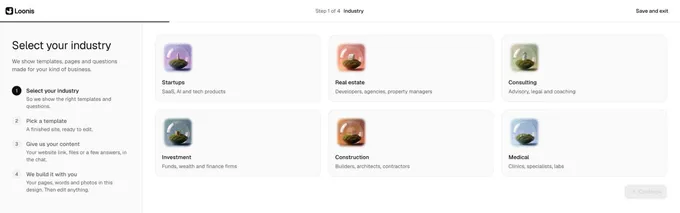
- Under "Select your industry", pick yours: Startups, Real estate, Consulting, Investment, Construction or Medical. Click "Continue".
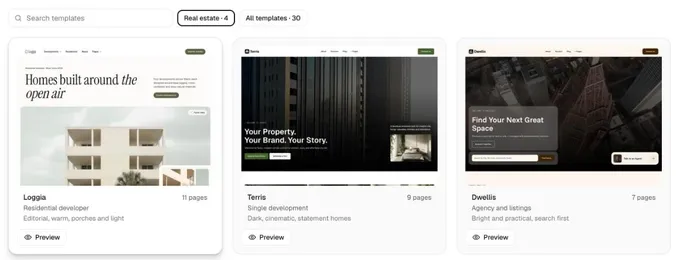
- Pick a template. Click "Preview" to look through it, then "Use this template". To see every template, click the "All templates" chip. Loonis makes your site in a few seconds.
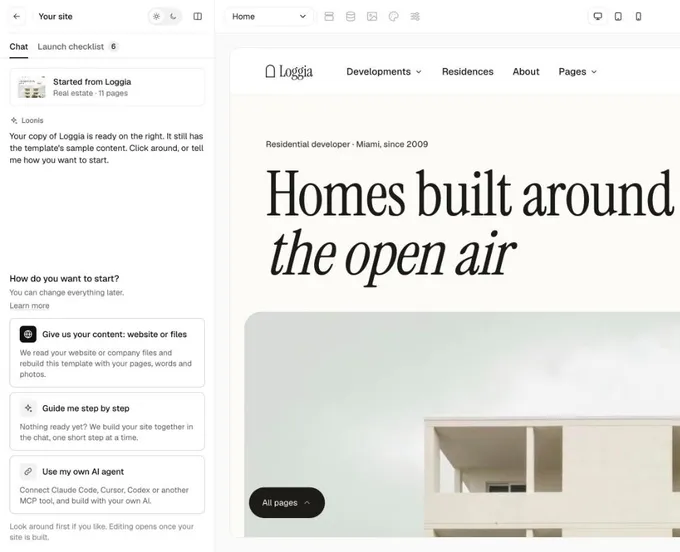
- The editor opens with the template's sample content. In the chat, under "How do you want to start?", pick "Give us your content: website or files", "Guide me step by step" or "Use my own AI agent".
- Answer the short questions in the chat: your pages, name and logo, colors, main button, photos and contact details. Then click "Build my site".
- Wait a few minutes while Loonis builds. You can leave the page: if your editor is closed, we email you when your site is ready.
- Check your site, edit it by chat or by hand, then publish.
Good to know
- No card is needed to start. You get a free first site build and 50 AI credits, once.
- Editing opens once your site is built. Until then you can look around.
Still stuck?
Email hello@loonis.co, we reply within 2 business days.