





Which way should I start my Loonis site?
ANSWER
Loonis gives you three ways to start: give it your website or files, build step by step in the chat, or connect your own AI agent on Pro or Premium. Pick the one that matches what you have ready.
The three ways
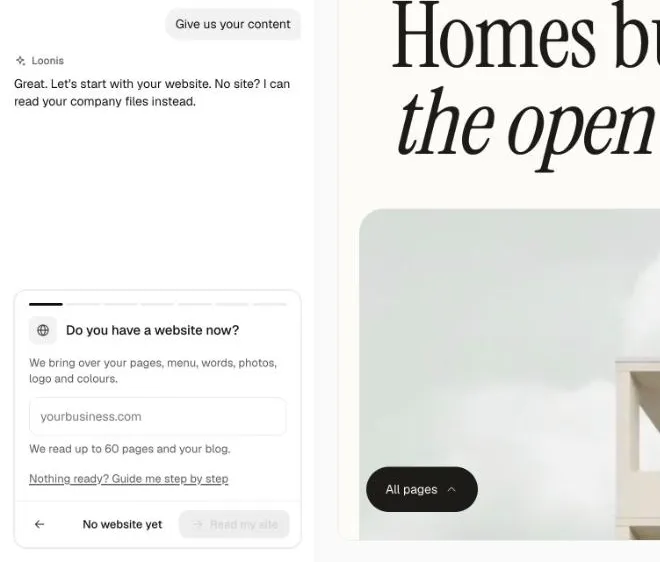
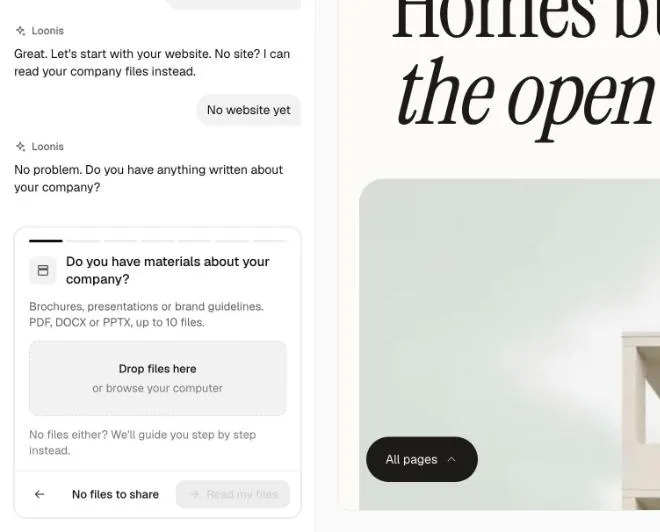
- Give us your content: website or files. Best if you have a website or brochures. Loonis reads up to 60 pages of your website and your blog, and brings over your pages, menu, words, photos, logo and colors. No website? Click "No website yet" and add files instead: PDF, Word (DOCX) or PowerPoint (PPTX) documents, photos and a brand book or logo.
- Guide me step by step. Best if nothing is ready yet. Describe what you do, for whom and where in a few sentences. Loonis writes a first draft in your words.
- Use my own AI agent. On Pro and Premium. Connect Claude Code, the Claude app or another MCP tool, and build with your own AI.
Steps
- In the editor chat, find "How do you want to start?".
- Click your way in.
- Website: type your address and click "Read my site". Reading takes up to 2 minutes. Files: drop them in and click "Read my files". Guided: fill in "Tell us about your business" and click "Next".
- Answer the questions: your pages, "Your name and logo", your colors, "What should visitors do first?", "Your photos and videos" and "How can people reach you?".
- Click "Build my site".
Good to know
- Reading a website or files uses 3 credits. If reading fails, you get them back.
- You can read a website up to 5 times a day.
- Files: up to 10 documents and 30 photos, 50 MB in total. A scanned PDF has no text Loonis can read.
- Nothing ready after all? Click "Nothing ready? Guide me step by step".
Still stuck?
Email hello@loonis.co, we reply within 2 business days.