





How do I add or edit blog posts and other lists?
ANSWER
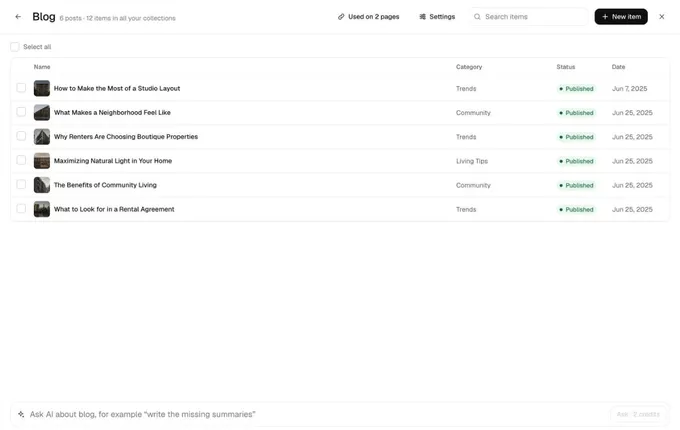
Blog posts, listings, services and other lists live in Collections in the Loonis editor's top bar. Open a list, click an item to edit it, or click "New item" to add one. Editing items by hand is free.
Steps
- Click "Collections" in the top bar. You see each list with its number of items.
- Click a list to open its table. Search it, or select items.
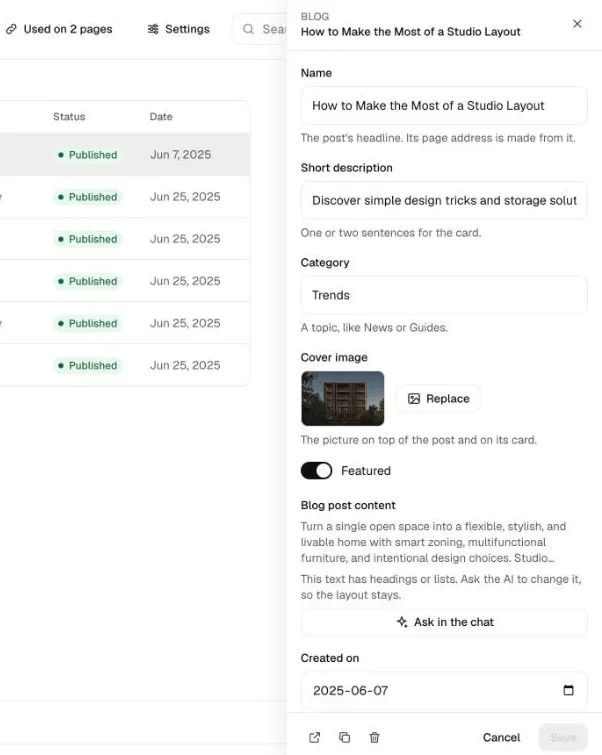
- Click an item to open it in a side panel. Change its fields, like the name, short description, category and cover image, then click "Save".
- To add one, click "New item", fill it in and save.
- To change many items at once, use the box at the bottom, for example "write the missing summaries". It uses credits and shows the cost first.
Good to know
- A long text with headings or lists, like a blog post's body, is changed in the chat: click "Ask in the chat".
- Each change is saved as a version. Undo it in the top bar, or with Cmd+Z (Ctrl+Z on Windows).
- "Used on" shows every page that shows the list.
- Items per site: Free 50, Pro 200, Premium 500.
- More items waiting on your old website? Use "Add the rest".
Still stuck?
Email hello@loonis.co, we reply within 2 business days.